Time calculator
Add or subtract durations in hours, minutes and seconds, find how long it is between two clock times (even overnight), or convert hours and minutes to decimal hours for a timesheet.
A plain number is read as minutes.
Show the working, step by step
Convert each time to seconds, combine, and convert back.
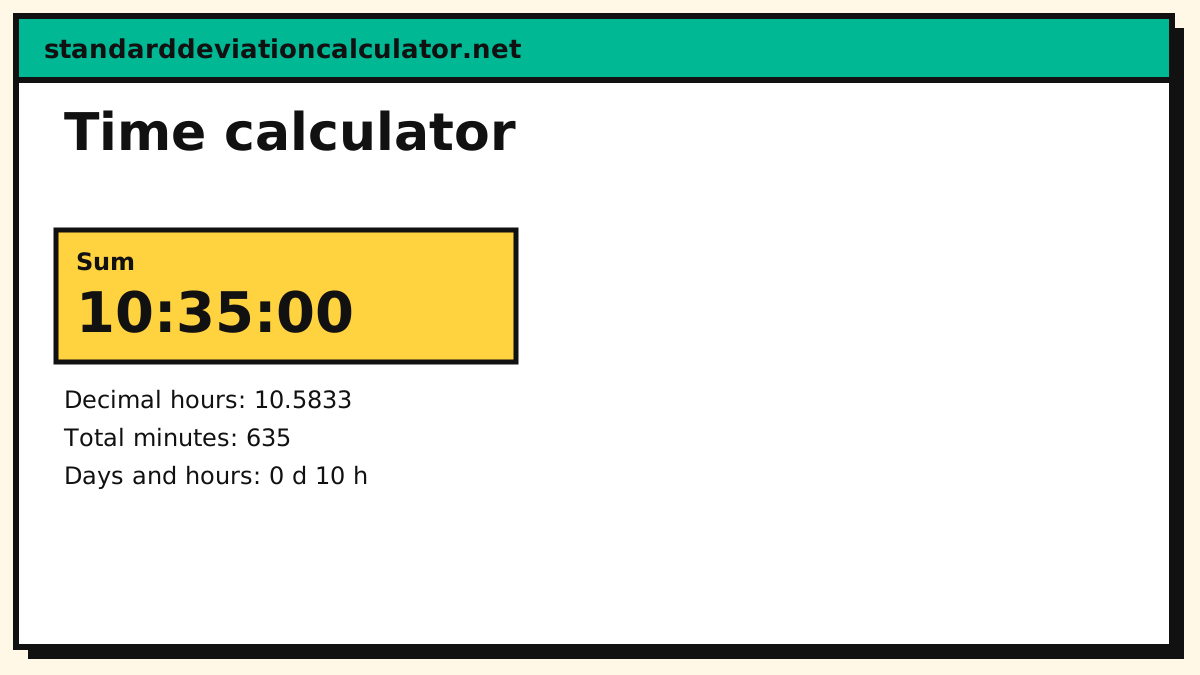
7:45:00 + 2:50:00 = 10:35:00
Working in base 60
Time is base 60, so the calculator converts everything to seconds, does the arithmetic and converts back. 7:45 + 2:50 = 465 + 170 = 635 minutes = 10:35. For payroll, 7:45 is 7.75 decimal hours because 45 ÷ 60 = 0.75.
How to use the time calculator
Choose what you want to do. Add durations sums two lengths of time, Subtract durations takes the second from the first, Hours between two clock times finds how long it is from one time of day to another, and Convert h:mm to decimal hours turns hours and minutes into a single decimal number. Type times as h:mm or h:mm:ss (for example 7:45 or 1:30:15); a plain number such as 90 is read as minutes. Clock times use the 24-hour clock, so 6:00 PM is 18:00. The result appears as hours:minutes:seconds, with decimal hours, total minutes and days-and-hours underneath, and the working shows each step.
How time arithmetic works
Time is written in base 60, so ordinary column addition fails: 45 minutes plus 50 minutes is not 95 minutes of a single hour. The calculator converts every time to seconds, does the arithmetic, and converts back. For 7:45 + 2:50, that is 27,900 + 10,200 = 38,100 seconds, which is 10 hours and 35 minutes, 10:35. Doing it by hand, add the minutes first (45 + 50 = 95), carry any full 60 into the hours (95 = 1 h 35 min) and add the hours (7 + 2 + 1 = 10).
Worked examples
- A week’s timesheet: shifts of 8:15, 7:50, 8:40, 6:25 and 4:00 add up to 35:10, which is 35.17 decimal hours.
- Subtracting: a task planned for 3:20 that has 1:45 left to run has used 3:20 − 1:45 = 1:35.
- Overnight shift: from 22:00 to 06:00 is 8 hours. When the end time is earlier than the start, the calculator treats it as the next day.
- Seconds: 1:30:15 is 1 × 3,600 + 30 × 60 + 15 = 5,415 seconds.
Decimal hours for payroll
Payroll and invoices usually want hours as a decimal: 7 hours 45 minutes is written 7.75, not 7.45. Divide the minutes by 60 and add them to the hours. Handy equivalents: 5 min = 0.08 h, 10 min = 0.17, 15 min = 0.25, 20 min = 0.33, 30 min = 0.50, 45 min = 0.75 and 50 min = 0.83 (rounded to two places). Pay is then hours times the hourly rate: the 35 hours 10 minutes above is 35.1667 hours, and at $18 an hour comes to $633.00. Keep the unrounded decimal until the last step so rounding does not creep into the pay.
Elapsed time across midnight and over several days
The “between two clock times” mode answers “how long from this time of day to that one?”, assuming the end is the next day if it comes earlier. It cannot tell whether more than one day has passed, because a clock time carries no date. For spans of several days use the date calculator; for a duration longer than 24 hours, add or subtract durations (the result’s “days and hours” cell shows 30:00 as 1 day 6 hours).
Time units worth remembering
A minute is 60 seconds, an hour 60 minutes (3,600 seconds), a day 24 hours (1,440 minutes, 86,400 seconds) and a week 168 hours. A common year has 8,760 hours. Knowing these makes quick checks easy: 90 minutes is 1.5 hours, 2.5 days is 60 hours, and 45,000 seconds is 12.5 hours. Some employers round recorded time to the nearest quarter hour (so 7:52 becomes 7:45 or 8:00); policies and rules vary, so follow your employer’s method and enter the times you are actually paid for.
Precision and rounding
Results are exact to the second, and the decimal-hours cell is shown to four decimal places, trimmed of trailing zeros. If you need hours to two decimals for an invoice, round only the final figure: 7:52:30 is 7.875 hours, which rounds to 7.88. Rounding each shift first and then adding can drift the total by a few hundredths of an hour over a month, which on a large payroll is real money.
Common uses
- Totalling hours worked and converting them to pay.
- Adding video or audio runtimes for a playlist or an edit.
- Adding race splits or lap times; the pace calculator turns the total into a pace.
- Planning a schedule, a flight or a cooking sequence in hours and minutes.
Common mistakes
- Treating minutes as decimals. 1:45 + 2:30 is 4:15, not 3.75 or 4.15.
- Reading 0.75 hours as 75 minutes. It is 45 minutes.
- Forgetting time zones and daylight saving. This calculator works on clock durations only; it does not know that a clock change can make a day 23 or 25 hours long.
- Mixing 12-hour and 24-hour times. Enter 5:30 PM as 17:30.
Common questions
How do you add hours and minutes?
Add the minutes and carry any 60 into the hours: 7 h 45 min + 2 h 50 min = 9 h 95 min = 10 h 35 min.
How do you convert minutes to decimal hours?
Divide the minutes by 60: 45 minutes = 0.75 hours and 20 minutes = 0.333 hours.
How are overnight shifts handled?
If the end time is earlier than the start, the calculator treats it as the next day, so 22:00 to 06:00 is 8 hours.
What is 8 hours 20 minutes as a decimal?
20 ÷ 60 = 0.333, so 8 hours 20 minutes is 8.33 hours (8.3333 before rounding). Multiply that by an hourly rate for pay.
Can it handle seconds?
Yes. Enter times as h:mm:ss, such as 0:03:45 for three minutes forty-five seconds. A bare number is read as minutes, so use 0:00:90 or 1:30 for ninety seconds.
How many hours are there between 9:15 and 17:45?
8 hours 30 minutes, which is 8.5 decimal hours: from 9:15 to 17:15 is 8 hours and 30 more minutes reaches 17:45.
Related calculators
-
Date calculator
Days between dates.
-
Unit converter
Time units.
-
Pace calculator
Running time and pace.
-
Percentage calculator
Share of a period.